


TL;DR
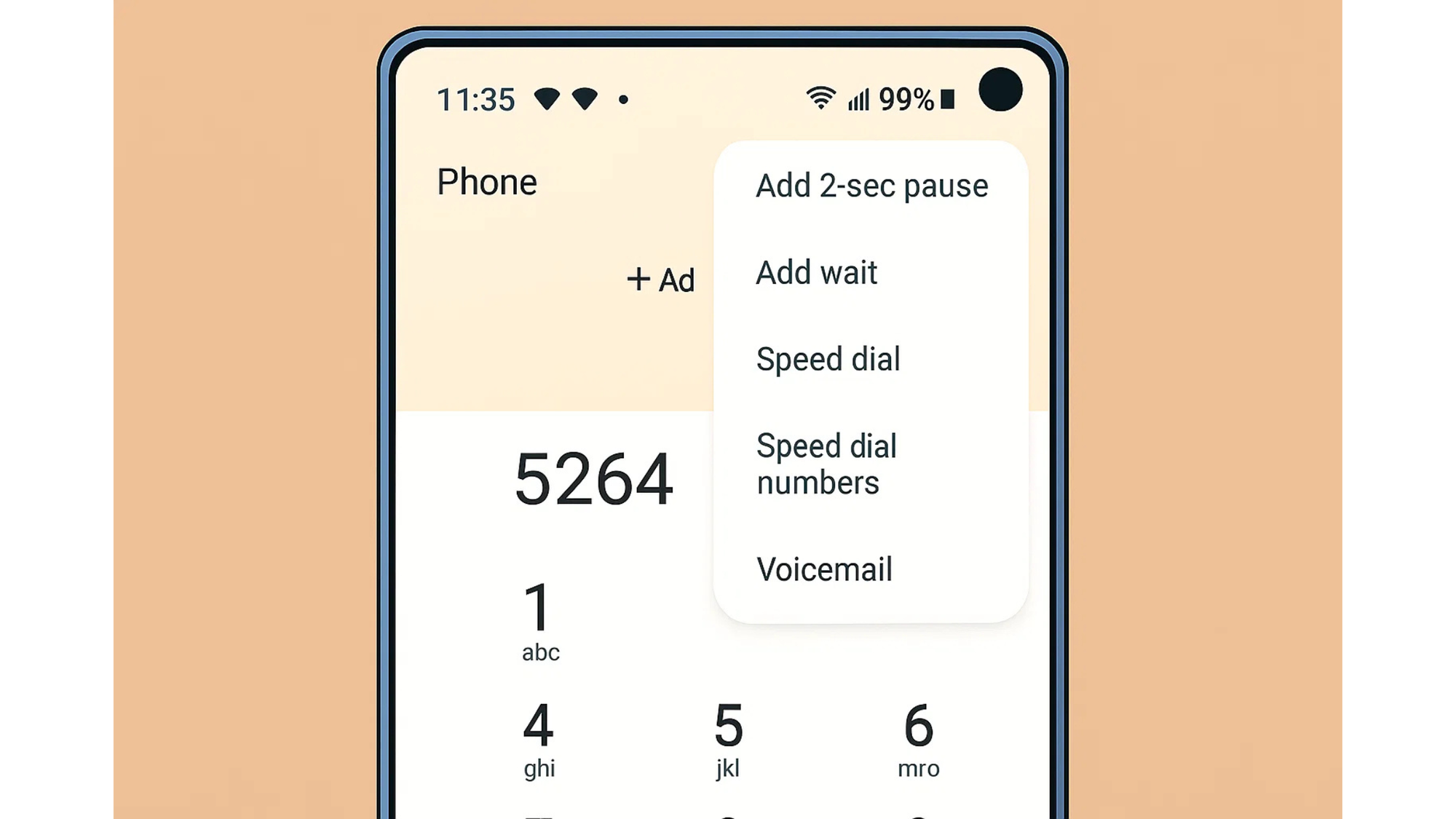
- Know the basics: an extension is a short internal number. On iPhone use Pause “,” or Wait “;”. On Android use “,” for a 2-second pause or “;” to confirm.
- Save smart contacts: store the base number in E.164 format, then add commas or a semicolon and the extension. Test once, adjust timing.
- Or skip menus entirely: use superu’s AI voice agent to answer, understand intent, and resolve calls without “press 1, 2, 3.”
What is a phone extension?
A phone extension is a short internal number that routes your call to a specific person or department inside a company’s phone system, often a PBX or modern VoIP PBX. That system connects the main business number to many internal extensions and automatically moves your call to the right line.
How do extensions work behind the scenes?
When you dial a company’s main number, their PBX receives the call and waits for an extension or menu choice. If you enter an extension, the PBX forwards your call to that user’s phone. Some businesses publish “direct inward dialing” numbers (DIDs) that skip menus and reach a person directly, no extension needed.
When should you dial an extension?
Use an extension when you already know the person or team you want, or when the IVR asks you to “enter the extension.” If a company gives you a dedicated DID, call that number instead to skip the menu.
How to call an extension: step by step
On iPhone
1. Open Contacts and edit the number.
2. Tap the +*# key to reveal options.
3. Choose Pause to add a two-second delay (shows as a comma “,”) and type the extension.
4. Or choose Wait (shows as a semicolon “;”) if you need to manually confirm when the menu finishes.
5. Save and call. iPhone will dial the base number, then the extension using your pause/wait rule.
When to use which:
- Use Pause (,) if the system accepts the extension right after the call connects.
- Use Wait (;) if the system talks for a while or asks you to “press pound to continue.”
On Android
1. Edit the contact’s number.
2. Insert a comma “,” for a two-second pause, or a semicolon “;” to wait for your confirmation.
3. Add multiple commas if the IVR is long.
4. Save and call.
Tip: Many Android dialers show Pause and Wait options on the keypad’s symbol menu. A comma is a two-second pause. A semicolon waits until you tap to continue.
On a landline or desk phone
Dial the main number, listen for the prompt, then type the extension. Some systems want a # after the extension to confirm. If you reach an operator, say the person’s name and extension and ask to be transferred.
How to save a contact with an extension (set and forget)
You can bake the extension into the contact so you never type it again.
- Auto after short menu: +1 415 555 0100,123
- Manual confirmation: +1 415 555 0100;123
- Longer menus: add more commas, like +1 415 555 0100,,123
On iPhone, Pause inserts a comma and Wait inserts a semicolon. On Android, type the comma or semicolon directly, or choose Pause/Wait from the keypad menu.
How it works: “pause” vs “wait”
- Pause (,): your phone delays for about two seconds, then sends the extension automatically. Chain multiple commas for longer delay.
- Wait (;): your phone stops and shows a prompt; you tap to send the extension. This behavior is built into iOS and common Android dialers.
Calling extensions from outside the company
From outside, you usually dial the main number, wait for the IVR, then enter the extension. If the company offers a DID, call that number to bypass menus and reach the user directly.
International calls with extensions
Always store the base number in E.164 format: a plus sign, country code, then the national number. Example: +91 22 5555 0000. Then add your comma or semicolon and the extension. This keeps the number portable across countries and carriers.
Troubleshooting: if the extension doesn’t work
- The IVR talks too long: add more commas before the extension, or switch to Wait so you can trigger it at the right moment.
- The system expects a pound/hash: save the sequence like ,123# or ;123# so it sends the symbol after the extension.
- Menu layers: save a sequence that mirrors the steps, for example ;1,3,123 to choose option 1, then pause, then option 3, then extension.
- External extensions blocked: if a company blocks outside extension entry, ask the operator to transfer you or request a DID.
Quick examples
- India business, short IVR: +91 22 5555 0000,123
- US support, long IVR with confirm: +1 415 555 0100;123
- Layered IVR then extension: +44 20 7946 0000;2,4,801
On iPhone contacts, insert Pause or Wait from the +*# keypad. On Android, type commas and semicolons or insert Pause/Wait from the dialer menu.
Why teams choose superU AI over IVR menus

You don’t need “press 1, 2, 3.” Our AI voice agents answer the call, listen, and act. Callers speak in natural language. The agent understands intent and resolves the task without forcing a menu. That’s faster and less frustrating than traditional IVR trees.
Understands intent, not button presses
superu captures what the caller wants in their own words and routes or resolves immediately. This removes long wait paths and reduces misroutes that happen in DTMF menus. Leading contact-center research and deployments show natural language flows speed up resolution and improve experience.
Resolves end to end
Our agent connects to your CRM, order, and ticketing systems to check status, update records, and complete transactions during the same call. No transfers. No callbacks. This is the core advantage of modern intelligent virtual agents: real actions, not just routing.
Conclusion
Save the base number in international format, then add the right pause or wait before the extension. Test once, adjust commas, and you’ll never fight a phone menu again.
superu replaces legacy IVR with a conversational front door that understands, solves, and finishes the job. Your callers talk. The system does the work.
FAQs
1. Do I need to add the company’s country code?
Yes. Save the base number in E.164 format so it works while traveling or using VoIP. Then add your pause/wait and extension.
2. Why does one contact work and another fails?
Different IVRs have different timing. One menu might accept the extension right away; another makes you listen first. Adjust commas or switch to a semicolon.
3. Can I skip extensions entirely?
Ask for a direct inward dialing number. Many teams publish a DID that reaches them without a menu.
Start for Free – Create Your First Voice Agent in Minutes
