

TL;DR
- SIP sets up, manages, and ends internet-based voice and video calls; it's the control layer behind VoIP.
- It replaces rigid phone lines with flexible, scalable SIP trunking for modern businesses.
- Platforms like superU use SIP underneath to deliver fast, reliable AI-powered calling without the telecom hassle.
What Is Session Initiation Protocol (SIP)?
Session Initiation Protocol is a signaling protocol that sets up, manages, and ends real time communication sessions like voice and video over IP networks.
Think of two parts of any internet call:
- The conversation itself, your voice or video.
- The instructions that say “call this person, ring that device, accept, hang up.”
SIP is the instructions part. It does not carry your actual audio. It only decides how and where that audio should flow.
Under the hood, SIP sits at the application layer (Layer 7) and works on top of IP. It is text based and looks similar to HTTP in structure, which makes it easier for engineers to read and debug.
A Short History: How Did SIP Get Here?
SIP did not appear from nowhere.
- Researchers proposed it in the mid-1990s inside the IETF.
- It became a standard in 1999 with RFC 2543 and later RFC 3261.
- In 2000, the mobile world adopted it for IP Multimedia Subsystem (IMS) for 3G networks.
Why does this matter to you? Because SIP was born in the internet world, not in the old telecom world. It was designed to be flexible, open, and extendable from day one.
SIP vs VoIP vs RTP: How Do They Fit Together?
This part confuses many people, so let’s clear it up.
- VoIP is the idea: sending voice over IP networks instead of traditional phone lines.
- SIP is one of the most popular signaling standards used to set up those VoIP calls.
- RTP (Real time Transport Protocol) actually carries the audio and video once the call is set up.
A typical flow looks like this:
1. SIP messages say “I want to call this number, using these codecs.”
2. The devices agree on settings using SDP (Session Description Protocol) inside SIP messages.
3. Once they agree, RTP streams the voice back and forth.
So when someone says “we use SIP,” they are talking about the control layer. When they say “we do VoIP,” they are usually talking about the overall system that includes SIP, RTP, and more.
How SIP Works When You Place a Call
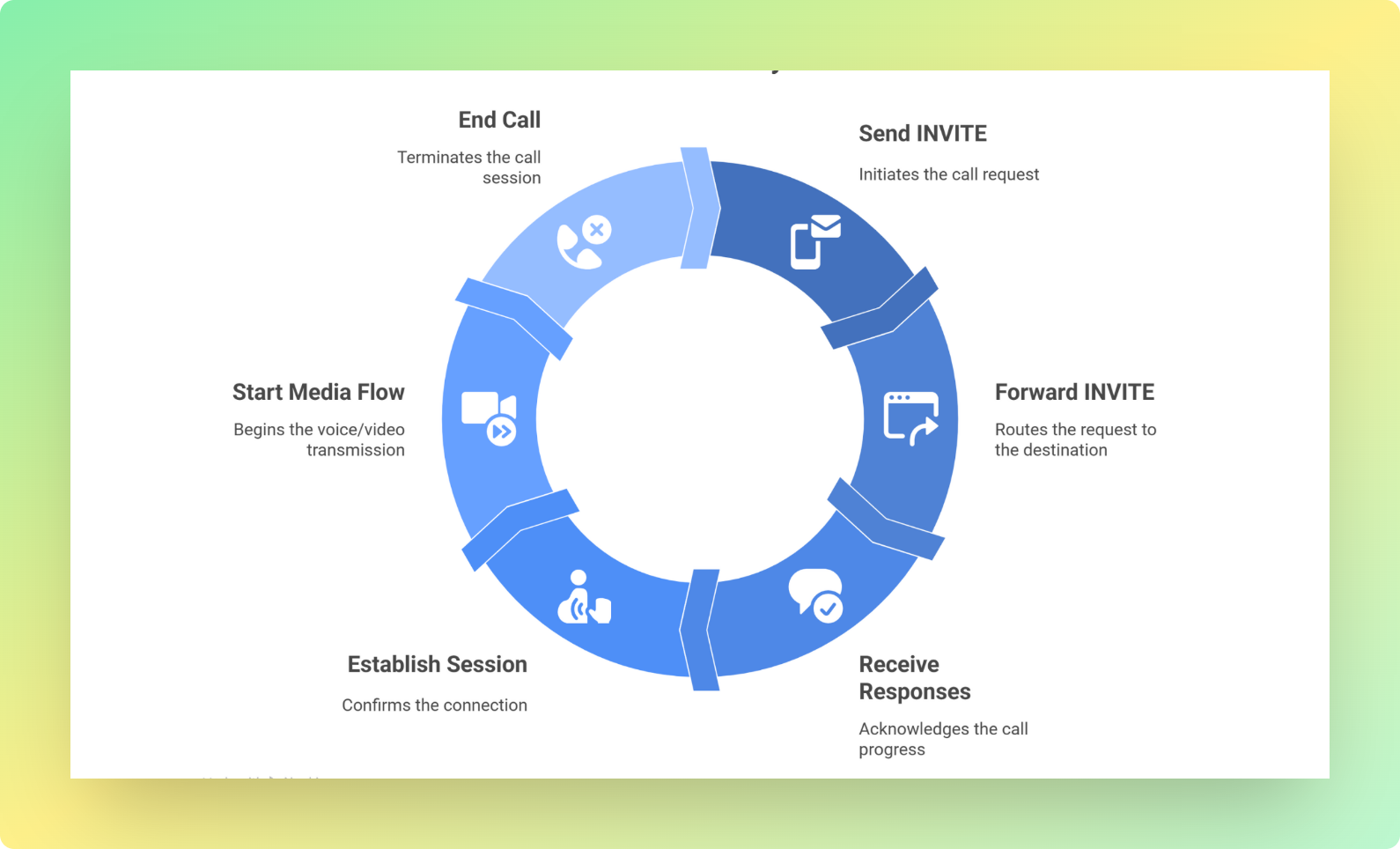
Let’s walk through a simple SIP call.
Imagine you open a softphone or an AI agent on superU and dial a number.
Behind the scenes:
1. Your SIP endpoint sends an INVITE request to the other side.
2. A SIP server or proxy forwards that to the destination, based on registration and routing rules.
3. The remote side replies:
- 100 Trying to say “I got this, hold on.”
- 180 Ringing to say “the phone is ringing.”
4. When the user picks up, their device sends 200 OK with session details.
5. Your side replies with ACK to confirm.
6. Media (voice / video) starts flowing over RTP.
7. When the call ends, one side sends BYE, the other answers 200 OK.
Every step is just a text message with headers and bodies, similar to HTTP. But together they map out the whole life of the call.
For an AI call center platform like superU, we automate all of this. You pick a phone number in the dashboard, connect your SIP trunk or carrier, and our infrastructure handles INVITE, ACK, BYE, and all the rest in the background.
Core Components In session initiation protocol
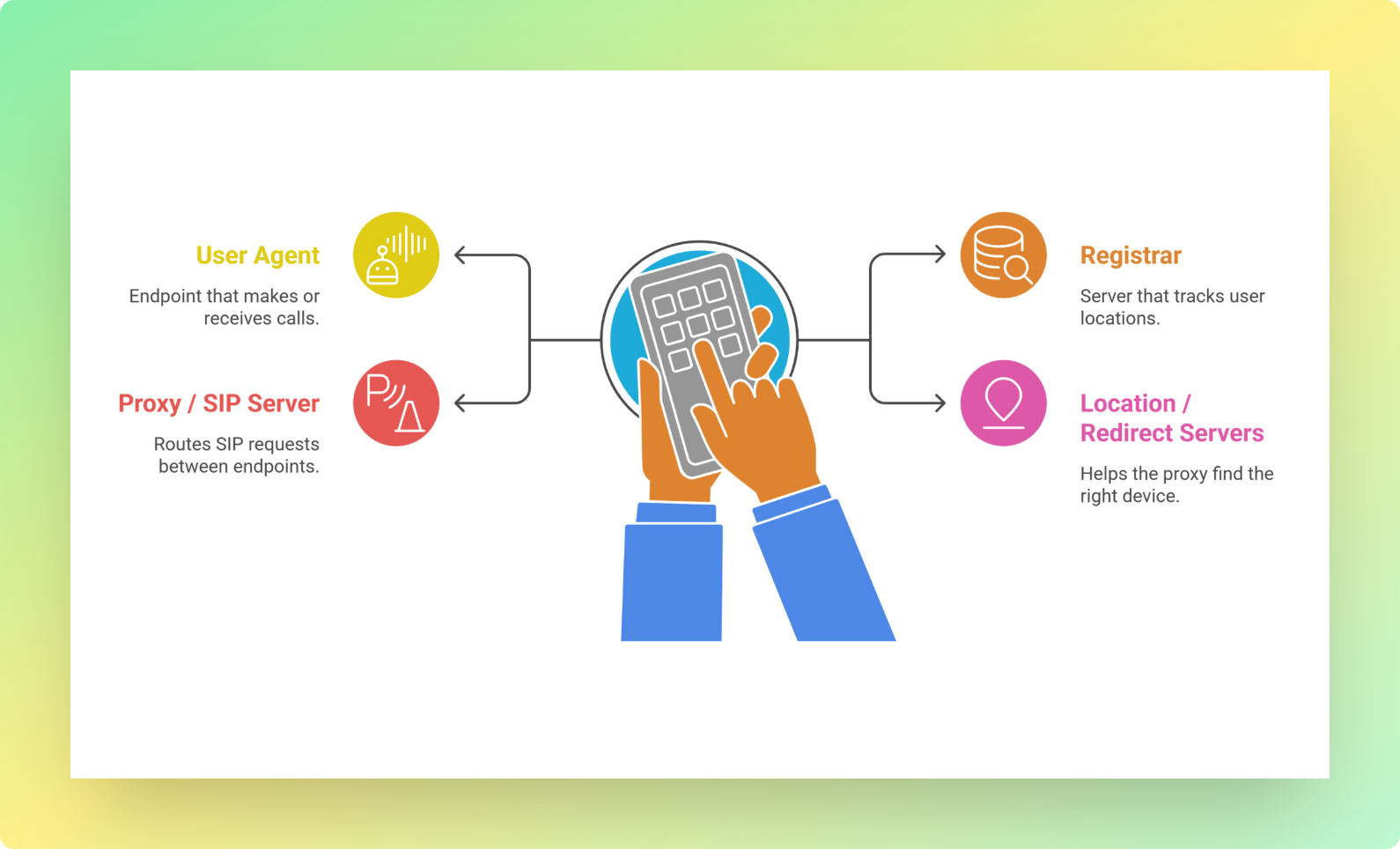
Inside a SIP network you usually see four main roles. Different vendors may combine them in one server, but the ideas stay the same.
1. User Agent (UA) This is any endpoint that makes or receives calls. Examples: IP phones, softphones, mobile apps, or an AI voice agent running on superU.
2. Registrar This server keeps track of where users currently are. Your phone “registers” with it, saying “I am user X, reachable at this IP and port.”
3. Proxy / SIP Server This is the traffic cop. It takes SIP requests from one endpoint and routes them to where they need to go. It may consult the registrar or a location server.
4. Location / Redirect Servers These help the proxy find the right device when a user has multiple possible locations.
In a traditional IP PBX, the SIP server is the heart of the system.
In a cloud platform like superU, the SIP layer sits inside our backend. You do not see it, but you benefit from it every time an agent picks up a call in your contact flow.
SIP Methods: The Most Important Ones To Know
SIP defines many request types, but you do not need to memorize all of them. A few cover most real-world cases.
- INVITE Starts a session. “I want to talk to this person.”
- ACK Confirms that a final response (like 200 OK) to INVITE was received.
- BYE Ends an existing session.
- CANCEL Cancels a pending INVITE if the call has not been answered yet.
- REGISTER Tells the registrar “this user is available at this network address.”
- OPTIONS Asks “what are your capabilities,” often used for health checks or feature checks.
Once you understand this small set, SIP logs become much less scary.
SIP Trunking: From Phone Lines To Virtual Lines
Now let’s connect this to the thing most businesses actually care about: phone bills and reliability.
1. What is a SIP trunk?
A SIP trunk is a set of virtual phone lines that uses SIP to connect your phone system to the public telephone network over the internet.
Instead of buying physical PRI lines from a carrier, you buy:
- A SIP trunk from a provider
- A pool of “channels” that represent how many concurrent calls you can run
The provider routes your inbound and outbound calls via SIP and RTP, not copper cables.
2. SIP vs PRI in plain language
Legacy PRI lines:
- Fixed number of channels (often 23 per circuit)
- Hardware bound
- Harder and slower to scale
- Often higher cost for long distance and international calls
SIP trunking:
- Uses your internet connection
- Lets you scale channels up or down in software
- Often cheaper, especially at scale
- Easier to use in multiple locations and remote setups
At superU, when you connect a SIP trunk or use our integrated carriers, your AI agents can make and receive calls globally without you touching physical hardware.
Use Cases: Where You See SIP Every Day
Session Initiation Protocol shows up in more places than just office desk phones.
Common uses:
- Cloud PBXs and hosted business phone systems
- Contact centers and support lines
- Video conferencing platforms
- Unified communications tools that mix voice, video, chat, and presence
- Mobile networks using VoLTE and IMS
In a platform like superU, SIP is the backbone that lets your AI agent:
- Answer inbound support lines
- Run outbound campaigns
- Switch between numbers, regions, and flows
- Integrate with CRMs and ticketing tools
You focus on what the agent says. SIP quietly makes sure the call itself exists.
SIP Security: Keeping Calls Safe
Because SIP runs over IP, it faces the usual internet risks:
- Eavesdropping on signaling or media
- Registration hijacking
- Toll fraud
- Denial of service attacks on SIP servers
To reduce these risks, modern deployments use:
- TLS to encrypt SIP signaling between endpoints and servers
- SRTP to encrypt the media (voice and video) streams
Along with that, you usually want:
- Strong authentication and complex SIP passwords
- Rate limits and firewalls that understand SIP
- IP allow listing where possible
- Regular patching of phones, SBCs, and PBXs
On a managed platform like superU, a lot of this is handled for you at the infrastructure layer. Your main job becomes choosing trusted providers and not leaking credentials.
What You Need To Deploy SIP In Your Business
If you want to use SIP directly in your own stack, you typically need:
- A stable internet connection with enough bandwidth and low jitter
- A SIP-capable PBX or a cloud provider
- SIP endpoints, such as IP phones, softphones, or AI agents
- At least one SIP trunk provider for external calling
- Basic QoS settings so voice traffic is not starved by bulk data
If you do not want to stitch it all together yourself, this is where a platform like superU becomes useful:
- We handle SIP servers, trunks, SBCs, and failover logic.
- You design your call flows and AI prompts.
- Your agents start talking to customers in minutes, not months.
You still benefit from SIP. You just skip the low-level plumbing.
Where superU Fits
If you are reading this as someone who owns or runs a business, your real question is not “what is SIP” but “how does this help me stop missing calls and losing revenue.”
This is where superU comes in.
Behind the scenes, our platform uses Session Initiation Protocol to:
- Connect AI agents to carriers, SIP trunks, and phone numbers worldwide
- Route calls to the right flow, language, and use case
- Record and analyze conversations so you can learn from every call
You do not need to tune SIP headers or debug responses. You design the conversation, pick the number, and set targets like “reduce missed calls” or “increase first call resolution.” The SIP layer quietly does its job in the background.
Conclusion
Session Initiation Protocol is the control system that starts, manages, and ends most modern internet calls you care about.
It decides who rings, how devices find each other, which codecs they use, and when to hang up. It powers everything from cloud PBXs and contact centers to AI voice agents and mobile calls over LTE.
FAQs
1. Is SIP still relevant today?
Yes. SIP remains the dominant signaling protocol for VoIP, unified communications, and many mobile voice services. It is used in IP PBXs, cloud phone systems, and IMS based mobile networks.
2. Is SIP the same thing as VoIP?
No. VoIP is the broader idea of making calls over IP. SIP is one widely used method for setting up and managing those calls. Other protocols exist, but SIP is the most common in open systems.
3. Can SIP handle video and messaging too?
Yes. SIP was designed for sessions in general, not only voice. It can handle voice, video, instant messaging, presence, and more, as long as the endpoints support those features.
4. What is a SIP URI?
A SIP URI looks a bit like an email address, for example sip:alice@example.com. It tells SIP where to route requests for that user.
Cut missed calls with SIP powered AI agents from superU, start today.
