


TL;DR
TalkAI is great for quick chats, learning, and drafts. When you need real phone automation and CRM workflows, switch to superU for reliable, scalable voice agents.
What is TalkAI?
TalkAI is a simple way to chat with an AI in your browser. It handles text chat, supports many languages, and even offers image generation on some versions. Voiceflow’s explainer notes that TalkAI covers text and image creation, making it a quick tool for ideas and creative work.
How does TalkAI work?
At a high level, you type or speak to the bot and it replies using large language models. Main part are NLP for understanding intent and context, plus real time feedback when you practice. That is what makes the experience feel more natural than a script.
If you only want quick access, talkai.info gives a web chat that routes requests to public models like OpenAI’s ChatGPT and Google’s Gemini variants. You open the page, pick a model, and start chatting.
What can you do with TalkAI? (Here are the core features)
- Text generation: outline ideas, draft copy, or get quick explanations. Voiceflow’s summary calls out general writing help.
- Image generation: enter a prompt and get visuals. Helpful for creative drafts or concept checks.
- Multilingual conversations: carry a chat in dozens of languages; Talkpal focuses on language learning use.
- Voice + text practice: switch between typing and speaking to improve fluency and pronunciation.
- Contextual feedback: get corrections and adaptive difficulty during learning sessions.
Who can use TalkAI?
- Students and language learners who want low barrier practice and instant feedback.
- Solo creators who need fast drafts and basic images.
- Small teams that want to test prompts before investing in a full build. (Use TalkAI to explore ideas; move to a builder when you need workflows and integrations.)
Real world use cases
- Language learning: do role plays, get pronunciation tips, and see grammar corrections.
- Content help: draft outlines, captions, or first drafts, then edit.
- Customer FAQ rehearsal: simulate ask and answer flows before you build a real bot. (When ready, use a builder with knowledge bases and APIs.)
- Idea to visual: generate simple images to explore directions before design time.
TalkAI pros and cons
Pros
- Free or low barrier to entry; some versions work without signup.
- Voice and text options for practice.
- Multilingual support and adaptive learning paths in language focused versions.
Cons
- Limited control for business use compared to full builders.
- Model quality and data handling vary by site or app; always review the specific provider’s details.
Quick view: TalkAI vs superU AI
Use this to pick the right tool for your goal today.
| Feature | TalkAI (web tools) | superU AI (voice agents) |
|---|---|---|
| Primary use | Casual chat, learning, quick drafts | Production voice agents for real calls and workflows |
| Channels | Web chat; some voice practice | Phone lines, inbound and outbound voice agents |
| Images | Yes, basic prompt to image on some versions | Not the focus; call automation and conversation quality |
| Integrations | Limited in simple web apps | Built to connect CRMs, APIs, analytics (business stack) |
| Best for | Students, solo creators, quick tests | Teams that need reliable voice automation at scale |
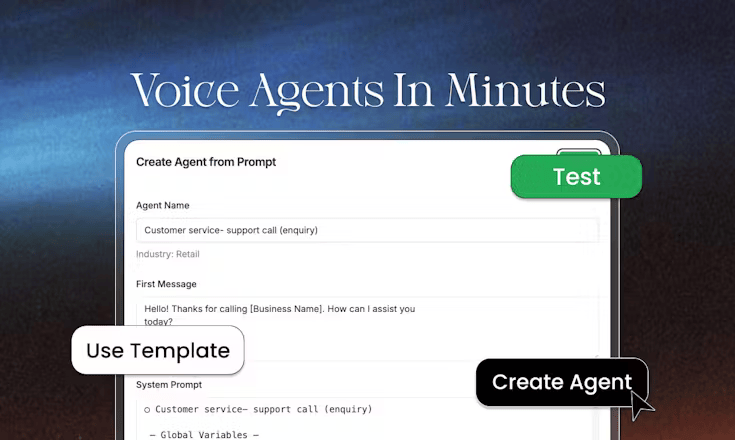
Note: superU is our platform. We prioritize live call quality, workflow control, and easy CRM hookups for sales and support.
Top 5 competitors to TalkAI
| Competitor | What it is best known for |
|---|---|
| ChatGPT (OpenAI) | General purpose AI chat and writing help |
| Gemini (Google) | Multimodal chat tied to Google’s ecosystem |
| Claude (Anthropic) | Helpful writing assistant with long context focus |
| Perplexity | Answer engine that cites sources |
| Voiceflow | Builder to design and deploy custom chat/voice agents with knowledge bases and integrations |
How to get started with TalkAI
1. Pick your access path:
- If you want “no signup” testing, open talkai.info and choose a model to try.
- If you want language learning, try Talkpal’s app or site and start a guided chat.
2. Set a small goal: a draft, a summary, or a 10 minute speaking practice.
3. Iterate: ask for changes, shorter answers, or more examples.
4. Save and review: keep what works, edit what does not.
5. When you need workflows or phone calls: move to a builder or a voice agent platform. Voiceflow covers agent design and integrations; superU covers real phone calls and live voice automation at scale.
Conclusion
You want speed. TalkAI gives you that. It helps you practice a new language, sketch a blog outline, or try a prompt without setup. When your team starts asking for recorded calls, CRM notes, routing rules, retries, and analytics, you need a different tool. You need call quality that does not break. You need ownership over data and flows. You need something you can ship to customers.
That is why I point readers to a builder for custom chat and a voice platform for production calls. Use TalkAI to explore. Use superU to operate.
Automate real customer calls with superU. Start fast and measure impact.
